Meta Introduces AI Photo and Video Editing Tools Directly in Instagram Stories
Key Points
- Meta adds AI‑based photo and video editing directly to Instagram Stories.
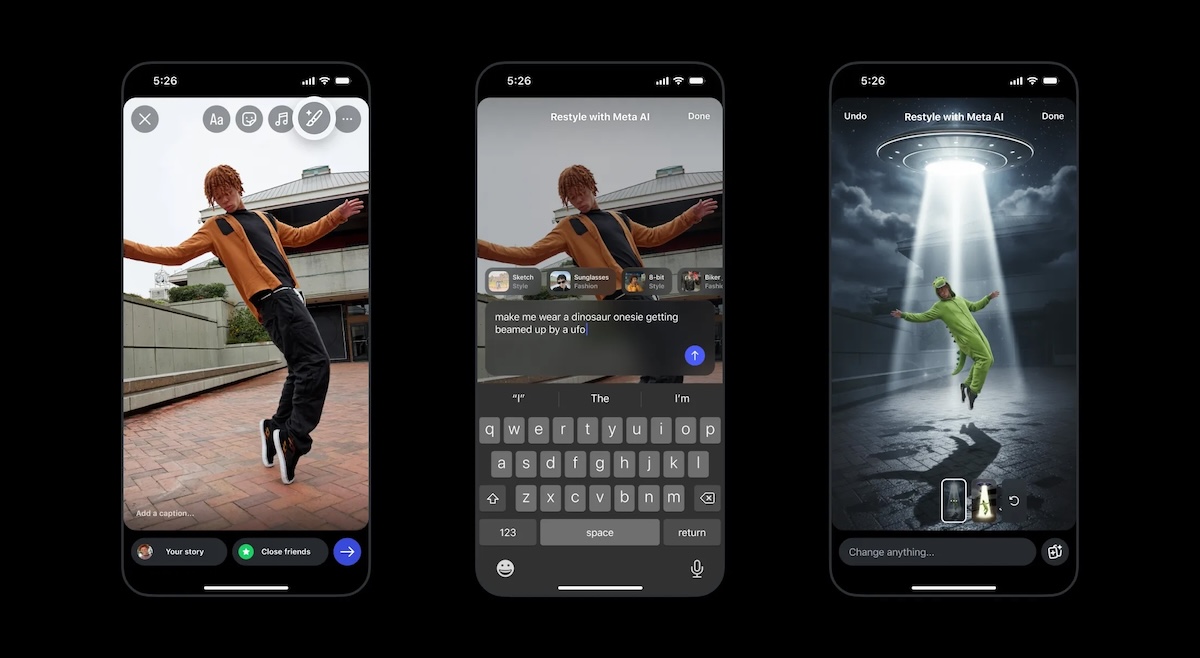
- Users access the tools via the paintbrush icon and the “Restyle” menu.
- Text prompts let creators add, remove, or change visual elements.
- Preset effects include outfit changes, artistic filters, and video overlays.
- The AI editing features expand beyond earlier chatbot‑only capabilities.
- Meta AI app introduced a new video feed called “Vibes,” boosting user numbers.
- Using the tools requires acceptance of Meta’s AI Terms of Service.
- Upcoming parental controls will let parents limit AI chat interactions.
Meta has rolled out AI‑powered photo and video editing features that users can access straight from Instagram Stories. By tapping the paintbrush icon and selecting the “Restyle” menu, creators can enter text prompts to add, remove, or change elements in their media, from hair color to background scenery. The rollout expands upon earlier AI capabilities that were limited to chatbot interactions, adding preset effects, style filters, and video overlays such as snow or flames. Meta also highlighted related AI updates, including a new AI‑generated video feed called “Vibes” and upcoming parental‑control options that let parents manage AI chat interactions for teen users.
AI Editing Tools Integrated into Instagram Stories
Meta is bringing its AI‑driven photo and video editing suite directly into Instagram Stories, letting users tweak visual content with simple text prompts. When creators tap the paintbrush icon at the top of the Stories interface, a “Restyle” menu appears. From there, users can choose actions labeled “add,” “remove,” or “change,” then type a description of the desired modification. The AI interprets the prompt and applies the edit in real time, allowing changes such as altering hair color, placing a crown on a head, or swapping a background for a sunset.
Beyond custom prompts, the feature offers preset effects that automatically adjust outfits or apply artistic styles. Users can quickly add items like sunglasses or a biker jacket, or apply a watercolor filter to transform the image’s look. For video stories, the AI can overlay seasonal or dynamic elements, such as making it appear as if snow is falling or adding flames to a scene.
Expansion of Meta’s AI Ecosystem
This integration builds on Meta’s earlier AI tools that were available only through interactions with the Meta AI chatbot. By embedding the editing capabilities directly into the Stories workflow, the company aims to make AI enhancements more accessible and intuitive for everyday creators.
Meta also announced a new AI‑generated video feed called “Vibes,” which debuted in the Meta AI app. The addition of “Vibes” appears to have driven a surge in app engagement, with daily active users on iOS and Android rising to 2.7 million, up from roughly 775 000 four weeks earlier.
Privacy and Usage Terms
Using the AI editing tools requires acceptance of Meta’s AI Terms of Service. Under those terms, uploaded photos and videos may be analyzed, summarized, modified, and used to generate new content. Users should be aware that facial features and other visual data are processed by the AI system as part of the editing workflow.
Upcoming Parental Controls
In response to parental concerns, Meta announced plans to introduce new parental‑control features. These controls will allow parents to disable chats with AI characters and monitor the topics their teenage children discuss with the Meta AI chatbot, providing an additional layer of oversight for younger users.
Overall, the rollout reflects Meta’s broader strategy to embed AI across its platforms, offering creators more powerful tools while also addressing privacy and safety considerations.