Instagram Rolls Out New Generative AI Tools for Stories
Key Points
- Instagram Stories now support generative AI editing for photos and video.
- New video restyle effects let users apply AI filters to short clips.
- A Presets browser shows all available AI styles for easy selection.
- Seasonal filters such as Halloween and Diwali are included.
- Add Yours sticker encourages followers to copy AI edits on their own Stories.
- Experimental AI text styling offers preset options and custom prompts.
- The tools bring Instagram closer to conversational editing seen in Google Photos.
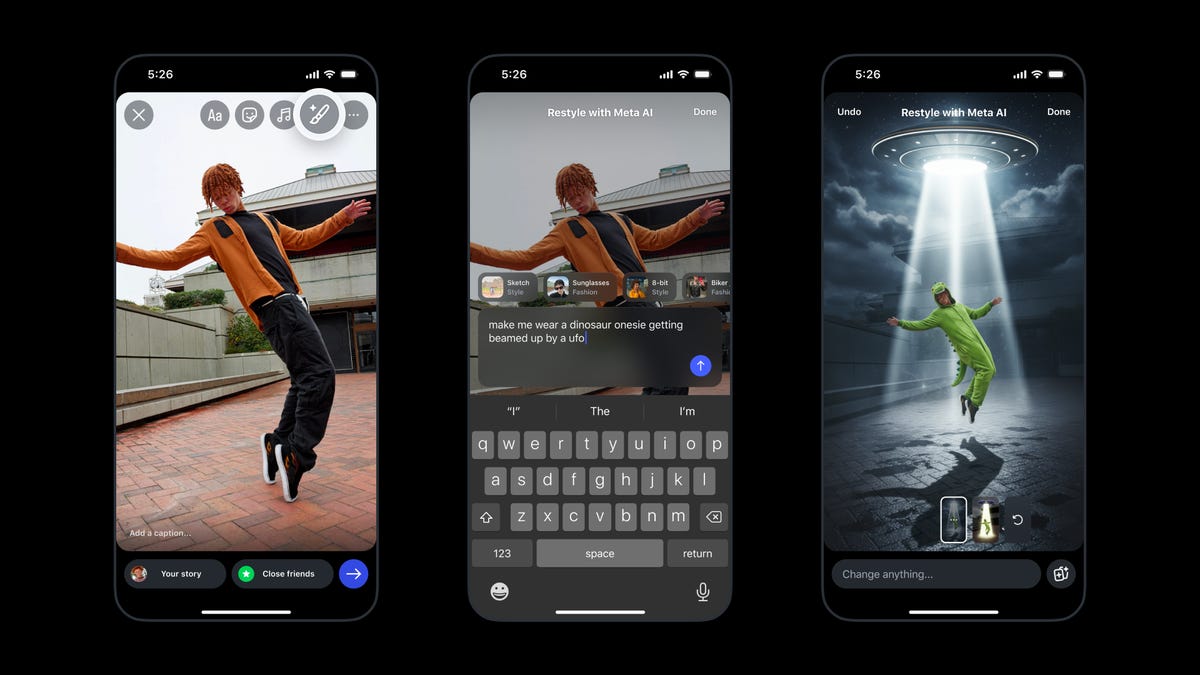
Instagram has upgraded its Stories feature with a suite of generative AI tools that let users edit photos and videos more creatively. The update introduces AI‑driven restyle effects for video, a new Presets browser, seasonal filters such as Halloween and Diwali, an Add Yours sticker for sharing edits, and experimental AI text styling options like "chrome" and "balloon." Users can now type prompts to remove elements, apply broader edits, or generate custom text effects, bringing the platform closer to the conversational editing seen in services like Google Photos.
AI‑Powered Editing Expands Across Instagram Stories
Instagram announced a significant upgrade to its Stories functionality, adding generative artificial‑intelligence capabilities that let creators modify images and video with simple text prompts. While the platform has previously allowed basic add‑remove functions for visual content, the new tools broaden the scope of edits, enabling users to remove objects, apply large‑scale transformations, or completely alter an effect by describing the desired change to Meta’s AI engine.
New Visual Features for Video and Photo
The update includes a set of video restyle effects that apply preset AI filters to short clips, letting creators add flair or remove unwanted items with a few taps. A Presets browser, accessed via a new icon at the bottom right of the editing screen, displays all available styles so users can quickly browse and select the look they want. Seasonal effects such as Halloween and Diwali are also added, giving Stories a timely visual boost.
Community‑Focused Sharing with Add Yours
Instagram introduced an Add Yours sticker that appears after a user restyles a photo they are proud of. The sticker invites friends and followers to replicate the same AI edit on their own Stories, fostering a collaborative creative loop across the platform.
Experimental AI Text Restyling
In addition to visual edits, Instagram is testing a feature that lets users apply AI‑generated text styles to their Stories. Options like "chrome" and "balloon" are available out of the box, and users can also enter custom prompts to generate unique text effects through Meta AI.
Positioning Within the AI Landscape
Meta’s AI tools have seen limited use on Instagram until now, but the latest rollout aims to make generative AI a central part of the Stories experience. The functionality mirrors conversational editing tools found in Google Photos, offering a more intuitive way for creators to refine their content without needing advanced editing software.
Looking Ahead
While the new features are currently available, Instagram continues to test and refine the AI text restyling capability. The rollout signals Meta’s commitment to integrating generative AI across its social products, potentially shaping how users craft and share visual stories in the future.