Google Workspace’s Vids AI Tool Gains New Avatar and Video Generation Features
Key Points
- Directable avatars can be instructed with typed commands, keeping face and voice consistent.
- Custom avatars let users design appearance, outfits, and backgrounds from scratch.
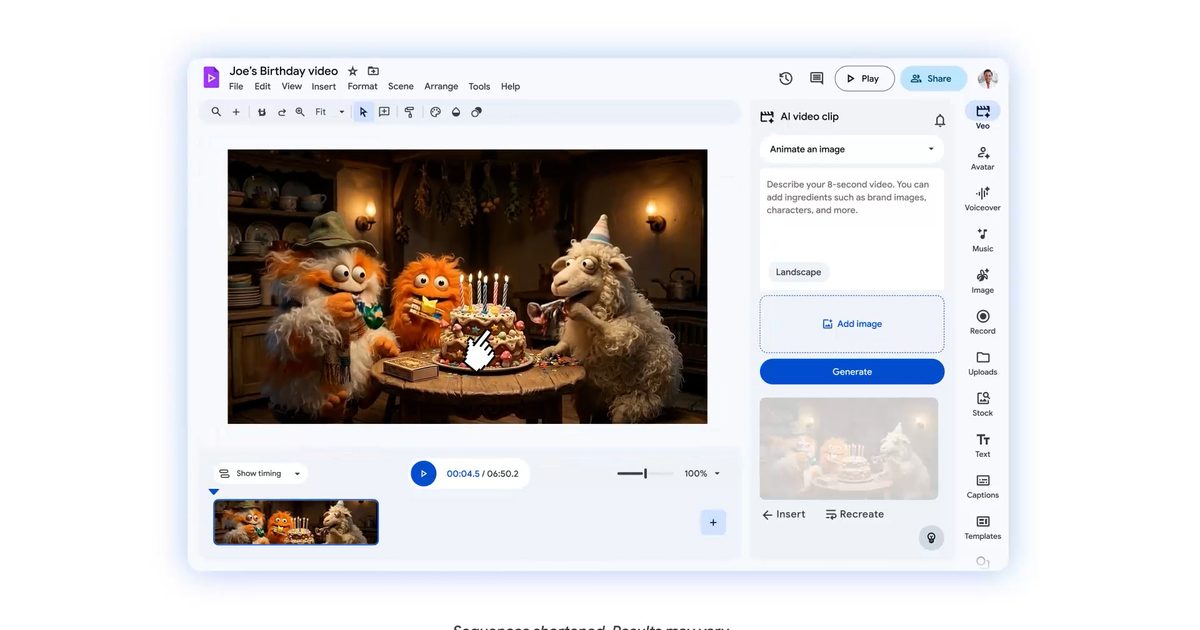
- Veo 3.1 integration creates short clips from prompts or images, with ten free 8‑second generations per month.
- One‑click export sends finished videos directly to YouTube.
- Built‑in Chrome extension records screen, voice, and webcam for tutorials and demos.
- Google’s AI track record suggests a polished, integrated tool, though real‑world testing is still needed.
Google Workspace’s AI‑powered video creator, Vids, has received a major upgrade that adds directable and custom avatars, a Veo 3.1 integration for on‑demand clip generation, direct YouTube export, and a built‑in screen‑recording Chrome extension. These tools let users type commands to control avatars, generate short video snippets from prompts, and streamline the production workflow, reducing the need for multiple apps and manual editing.
Expanded Avatar Controls
Vids now lets users insert avatars into scenes and give them specific instructions by typing commands. Users can ask an avatar to pick up a phone, point at a chart, or walk through a product demo, and the avatar’s face and voice stay consistent throughout the clip. In addition to the built‑in avatars, creators can design custom avatars from scratch, adjusting appearance, outfits, and backgrounds to match the tone of the video. This flexibility allows the same avatar to present quarterly results in a formal office setting and then switch to a bright, casual backdrop for a product walkthrough without losing identity.
Veo 3.1 Integration for Instant Clip Creation
The new Veo 3.1 integration enables users to generate short video clips directly inside Vids by entering a text prompt or uploading an image. For example, typing “a cinematic drone shot of a beach at sunset” produces an 8‑second clip in seconds. Vids provides ten free 8‑second generations each month, giving creators a quick way to add dynamic footage without leaving the platform.
Simplified Publishing and Recording
Once a video is finished, Vids offers a direct export option to YouTube, allowing creators to publish their work without leaving the tool. Additionally, a built‑in screen recorder accessed through a Chrome extension captures screen activity along with voice or webcam input. This feature is useful for tutorials, demos, or walkthroughs, eliminating the need for separate recording software.
Overall Impact on Video Production
Google’s history of careful AI rollouts is reflected in Vids’ new capabilities, which aim to reduce friction in video creation. Tasks that previously required multiple tools, repeated attempts, and significant patience—such as avatar direction, clip generation, and final polishing—are now streamlined within a single interface. While the upgrades sound promising on paper, the source notes that a deeper hands‑on evaluation is needed to determine where Vids excels and where it may still stumble.