ChatGPT Integrates Shazam for In‑Chat Song Identification
Key Points
- Shazam is now accessible directly inside ChatGPT.
- Users must link Shazam via the Apps page before use.
- Prompt ChatGPT with phrases like “Shazam, what’s playing?” to start identification.
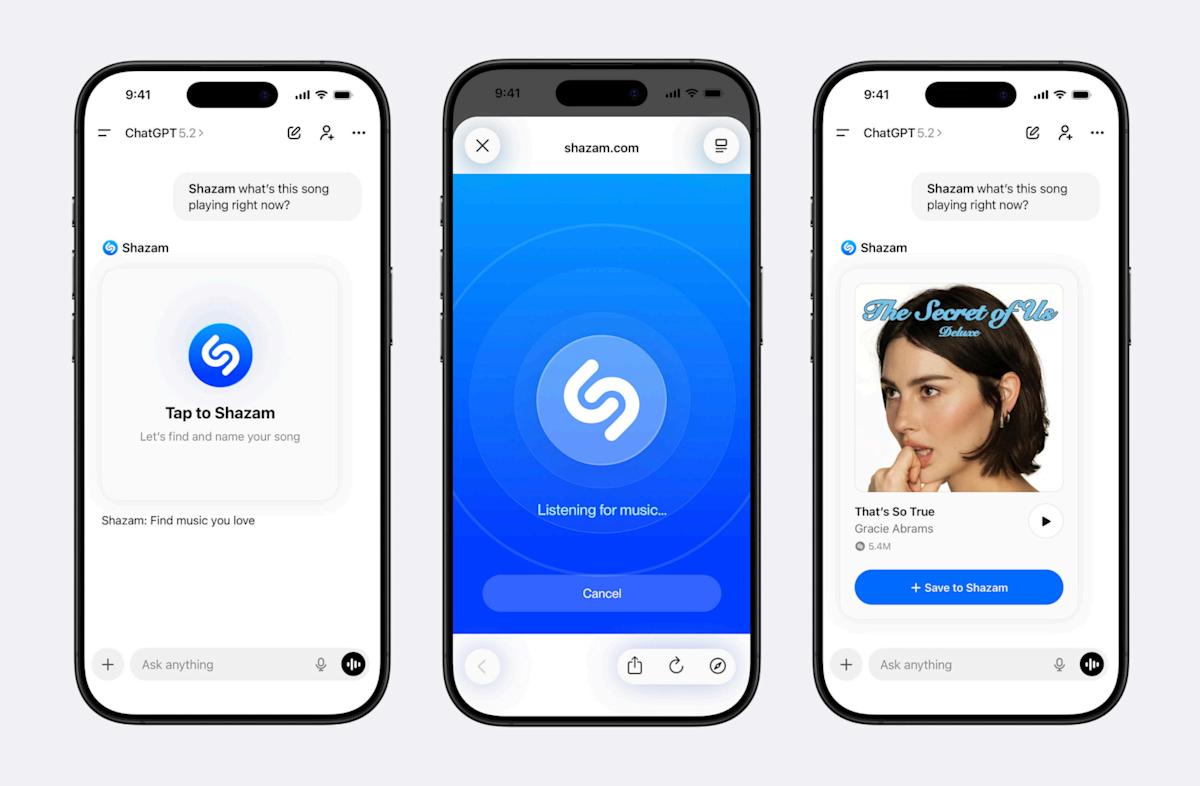
- A pop‑up box captures the audio and returns song title, artist and artwork.
- Identified songs can be saved to the Shazam library from within ChatGPT.
- The feature works even if the Shazam app is not installed on the device.
- Rollout is global on iOS, Android and the web platforms.
Shazam is now built directly into ChatGPT, allowing users to identify songs without opening the separate music‑discovery app. After linking Shazam from the Apps page, users can summon the service with prompts such as “Shazam, what’s playing?” A pop‑up box captures the audio, and ChatGPT returns the song title, artist and artwork, with an option to save it in Shazam. The feature works even if the Shazam app is not installed, and it is rolling out globally on iOS, Android and the web.
Integration Overview
ChatGPT has added a new capability that brings the Shazam music‑identification service inside the chatbot environment. This integration enables users to ask the AI to recognize a song that is playing around them without having to launch the dedicated Shazam app on their device.
Linking Shazam to ChatGPT
To activate the feature, users must first link the Shazam app through the Apps page within ChatGPT. Once the connection is established, the Shazam function becomes available for in‑chat use. The linking step is the only prerequisite; after it is completed, the service can be accessed at any time while using ChatGPT.
How to Use the In‑Chat Shazam
When a song is heard, the user simply types a prompt such as “Shazam, what’s playing?” or “Shazam, what is this song?” ChatGPT responds by displaying a pop‑up box that the user can tap to start the music‑discovery process. The box listens to the ambient audio, captures the tune, and then returns the identification results.
Results Displayed
After the audio is processed, ChatGPT shows the song’s name, the performing artist and the associated artwork. An additional option allows the user to save the identified track directly to their Shazam library, streamlining the process of keeping track of discovered music.
Benefits Without the Standalone App
A notable advantage of the integration is that it works even if the Shazam app is not installed on the device. This is especially useful for users whose phones have limited storage space or who prefer not to download additional applications. The in‑chat experience provides a seamless alternative that eliminates the need to switch between apps.
Global Rollout
The Shazam integration is being rolled out worldwide across all major platforms supported by ChatGPT. Users on iOS, Android and the web can all access the feature, ensuring broad availability regardless of the device or operating system they use.
Implications for Users
By embedding Shazam within ChatGPT, the combined service offers a more convenient and efficient way to discover music. Users can stay within a single conversational interface while leveraging the powerful audio‑recognition technology that Shazam provides. This convergence of AI chat and music identification reflects a growing trend of bringing specialized functions into unified platforms, improving overall user experience.