Anthropic Unveils Claude Cowork, AI Assistant for Everyday Users
Key Points
- Claude Cowork extends Claude Code to non‑developers
- Users grant folder access for file reading, editing, and creation
- Can organize downloads, rename files, and convert receipt images to spreadsheets
- Chrome plugin enables website navigation
- Connectors allow interaction with apps like Canva
- Tasks can be queued for parallel processing
- Only acts on data explicitly authorized by the user
- Initial access limited to Claude Max subscribers on macOS, others join waitlist
- Anthropic positions Cowork against competitors such as Microsoft Copilot
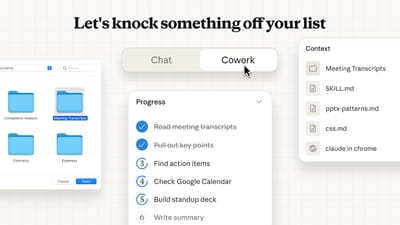
Anthropic has launched Claude Cowork, a preview feature that extends its Claude Code AI to non‑developer users. By granting the assistant access to a folder, users can have it read, edit, or create files, organize downloads, convert receipt screenshots into spreadsheets, and browse websites via a Chrome plugin. The tool also integrates third‑party apps through Anthropic’s Connectors framework. Initially, Claude Cowork is available to subscribers of the Claude Max plan on macOS, with a waitlist for additional users.
Background
\nSince the fall of 2024, Anthropic has been training its AI models to use and navigate computers like a human would. Claude Code, the company’s coding agent, emerged as the most practical expression of that work, giving developers a way to automate routine programming tasks.
\nWhat Is Claude Cowork?
\nClaude Cowork is a preview extension of Claude Code, designed to let anyone—not just developers—use the model as a personal computer assistant. The service works by giving Claude explicit permission to a folder on the user’s computer, after which the AI can read, edit, or create files within that location.
\nKey Capabilities
\nAnthropic highlights several practical uses. Users can ask Claude to organize a downloads folder, renaming files for easier recognition. The assistant can also transform screenshots of receipts and invoices into a structured spreadsheet for expense tracking. With the Claude Chrome plugin, the AI can navigate websites, and through the Connectors framework it can interact with third‑party applications such as Canva.
\nClaude Cowork is built to reduce the need for users to repeatedly supply context or reformat the AI’s output. Tasks can be queued, allowing the model to work on multiple items in parallel, and users can provide feedback while the assistant continues processing.
\nSafety and Limitations
\nAnthropic emphasizes that Claude can only act on files or data that the user explicitly authorizes. Nevertheless, the company warns that the system can perform potentially destructive actions, such as deleting important files, if instructions are unclear. Users are therefore encouraged to give precise guidance.
\nAvailability
\nAt launch, Claude Cowork is offered first to subscribers of Anthropic’s Claude Max plan, who must run the macOS Claude app. Others can join a waitlist to gain access later. The preview marks Anthropic’s push into the broader consumer market, following similar efforts by competitors like Microsoft’s Copilot.
\nMarket Context and Outlook
\nMicrosoft’s Copilot, a three‑year‑old AI assistant integrated into Windows and Office, has seen modest uptake, highlighting the challenge Anthropic faces in gaining consumer traction. If Claude Cowork proves effective, it could broaden the appeal of AI assistants beyond technical users, potentially reshaping how everyday tasks are automated.