Anthropic Expands Claude with Autonomous Computer Control in Code and Cowork
Key Points
- Anthropic adds autonomous computer control to Claude's Code and Cowork tools.
- Feature is a research preview for Claude Pro and Max subscribers.
- Requires the Claude desktop app on a supported Mac and pairing with the mobile app.
- AI first uses service connectors, then falls back to direct mouse, keyboard and display control.
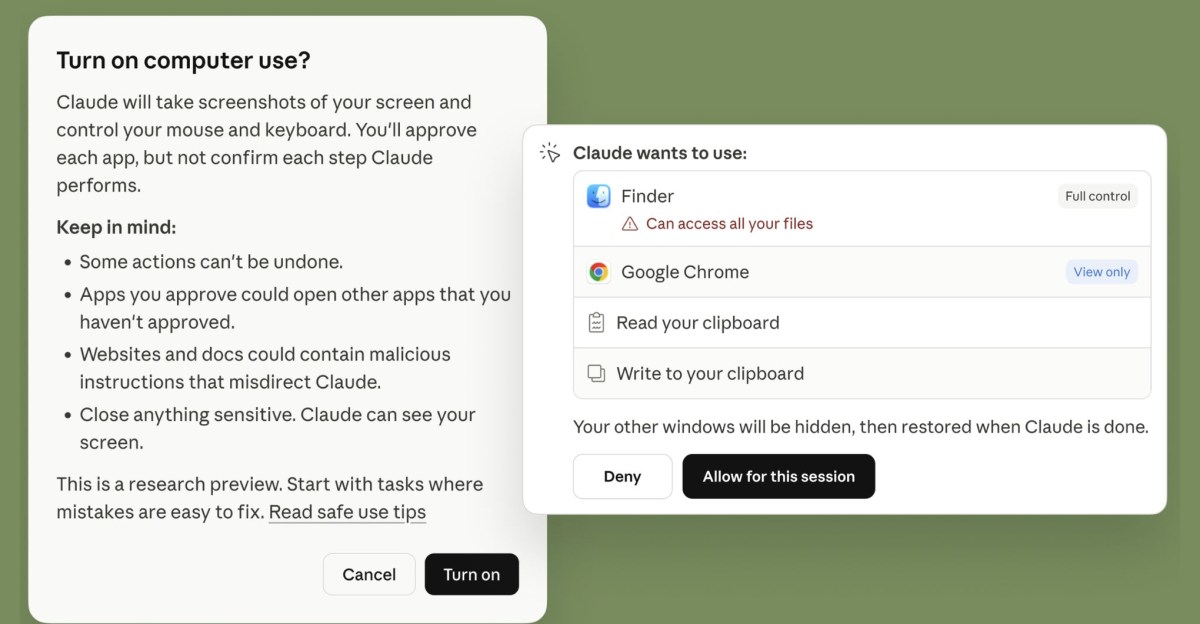
- Claude always asks for explicit permission before taking any action on the screen.
- Works best with the Dispatch cross‑device task assignment feature.
- Complex tasks may need multiple attempts and can be slower than direct integrations.
- Designed to help developers and knowledge workers automate routine computer actions.
Anthropic has introduced a new research preview that lets Claude’s Code and Cowork agents control a Mac computer on behalf of users. The feature lets the AI open files, browse the web, run development tools and interact with apps without any setup, and it is available to Claude Pro and Max subscribers. Users must run the Claude desktop app on a supported Mac and pair it with the mobile app. The system asks for explicit permission before taking actions and can fall back to direct control of the mouse, keyboard and display when integrations are unavailable.
Anthropic Announces Autonomous Computer Control for Claude
Anthropic has rolled out a research preview that enables its Claude chatbot to perform tasks on a user’s Mac computer autonomously. The capability is built into the Code and Cowork AI tools that target developers and knowledge workers. By allowing the AI to open files, navigate web browsers, launch applications and run development utilities, the system aims to let users accomplish routine or complex tasks without manual interaction.
Availability and Subscription Model
The new functionality is offered as a research preview to subscribers of Claude Pro and Claude Max. To use the feature, the Claude desktop application must be running on a supported Mac device and be paired with the mobile version of the chatbot. This pairing enables cross‑device task assignment, a capability Anthropic calls Dispatch, which lets users send tasks from their phone to the desktop app.
How the Autonomous Feature Works
When a user asks Claude to perform a task, the system first attempts to use built‑in connectors to supported services such as Slack and Google Workspace. If a connector is unavailable, Claude can still complete the request by directly controlling the computer’s mouse, keyboard, display and web browser. The AI always seeks explicit permission before it begins exploring, scrolling or clicking, ensuring that users retain control over what actions are taken on their machine.
Strengths and Limitations
Anthropic notes that the autonomous mode works especially well with the Dispatch feature, allowing seamless hand‑off of tasks between devices. However, the company also acknowledges that complex tasks may require multiple attempts and that interacting through the screen can be slower than using a direct integration. By releasing the feature early, Anthropic hopes to gather feedback on where the technology excels and where it falls short.
Implications for Developers and Knowledge Workers
The addition of autonomous computer control expands Claude’s role from a conversational assistant to a hands‑on productivity tool. Developers can have the AI open code editors, run build commands or fetch documentation without leaving the chat interface. Knowledge workers can ask Claude to retrieve information from web pages, fill out forms or navigate internal tools, reducing the time spent on repetitive actions.
Future Outlook
While the preview is currently limited to macOS devices, Anthropic’s roadmap may include broader operating‑system support as the technology matures. The company’s emphasis on explicit user permission and transparent operation suggests a focus on safety and user trust as autonomous AI capabilities become more widespread.